

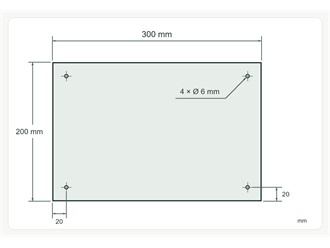
How to mark mounting holes on a plastic sheet drawing
Does 20 mm mean to the edge of the hole or to its centre? A four-hole example shows how to specify hole positions and diameters when ordering a cut-to-size sheet.
Where do the measurements start?
Draw the sheet as seen from the front. Give its width, height and thickness, and state that all dimensions are in millimetres. Mark the centre of each hole with a cross. Give two measurements to that cross: one from the left edge of the sheet and one from the bottom edge. Label the diameter separately using the Ø symbol.
Example: four holes in a 300 × 200 mm sheet
Suppose each hole centre is 20 mm from its two nearest edges. The two columns of centres are then 20 and 280 mm from the left edge; the two rows are 20 and 180 mm from the bottom. If all four holes are 6 mm in diameter and go all the way through, label them 4 × Ø 6 mm through. These figures illustrate how to mark a drawing. The diameter and edge distance for your part depend on the fixing.
What else should go in the enquiry?
Include the material, sheet thickness and quantity. If the sheet has to match an existing bracket, identify the critical dimensions and any known tolerances. Give the depth of any blind holes. If a screw head needs to sit flush with the surface, mark the side to be countersunk and give the countersink dimensions.
